Hydration in Node.js + MongoDB (Without the Jargon Headache
Full Stack Engineer specializing in the JavaScript Ecosystem (Next.js, Node.js, TypeScript). Expert in building scalable, production-grade web platforms (e.g., ChromaDec) with a focus on high-performance architecture. Additionally skilled in Enterprise Microservices (Java/Quarkus) and Cross-Platform Mobile development, bringing strict backend discipline to the modern web stack.
If you’ve been working with Node.js and MongoDB for a while, you’ve probably heard the word hydration thrown around.
It sounds fancy. Maybe even a little intimidating.
But honestly?
It’s way simpler than it sounds.
Let’s break it down like friends, not like documentation.
So… what does “hydration” actually mean?
Here’s the simplest definition I’ve found that actually sticks:
Hydration = turning raw MongoDB data into smart JavaScript objects
When data is hydrated, it’s not just JSON anymore.
It becomes an object with behavior.
That means it can:
Have methods
Expose virtual properties
Use getters and setters
Track changes so it knows what to save back to the database
Without hydration, your data is just… data.
No brains. No personality. Just plain objects.
Where hydration usually shows up: Mongoose
Hydration is most commonly talked about when using Mongoose, the popular ODM for MongoDB.
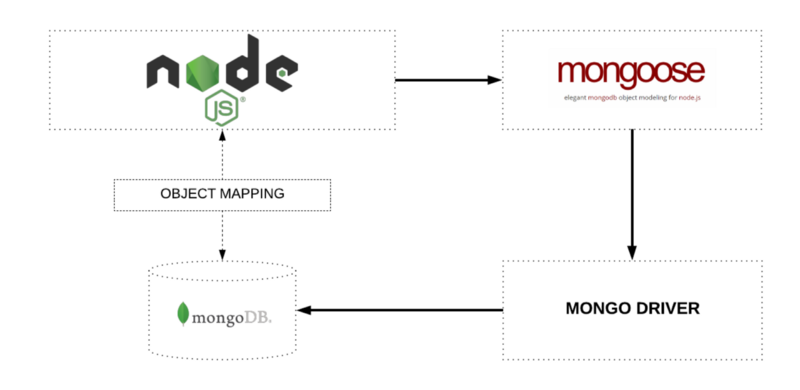

When you query MongoDB through Mongoose, hydration happens by default.
The hydrated (default) case ✅
const user = await User.findOne({ email: "test@example.com" });

user.fullName(); // custom method works
user.save();     // change tracking works
What you get back here is a Mongoose Document.
That means:
Data ✅
Schema rules ✅
Methods & virtuals ✅
All bundled together. Fully hydrated.
The non-hydrated (lean) case ❌
Now compare that with this:
const user = await User.findOne({ email: "test@example.com" }).lean();

user.fullName(); //  undefined
Here’s what changed:
useris now a plain JavaScript objectNo methods
No virtuals
No magic
But it is faster and lighter.
This is what people mean when they say “skip hydration.”
Manual hydration (yes, that’s a thing)
Sometimes you already have raw data.
Maybe it came from:
A cache
An aggregation pipeline
Another service
You can hydrate it manually:
const rawUser = { _id: "...", name: "Alex" };
const user = User.hydrate(rawUser);

user instanceof User; // true
Boom.
Your plain object just became a full model instance again.
This is often called rehydration.
Why hydration actually matters
Hydration isn’t just an academic concept.
It affects how your app behaves.
The good stuff
You can call schema methods
You can use virtual fields
You get validation
You get automatic change tracking
The trade-offs
Slightly slower
Slightly more memory usage
Nothing dramatic — but noticeable at scale.
When you shouldn’t hydrate
Hydration is great… until it isn’t.
Use .lean() when:
You’re building read-only APIs
You just want to return JSON
You care deeply about performance
User.find().lean(); // fast and lightweight
This is one of the easiest performance wins in a Node.js + MongoDB app.
Important clarification: MongoDB doesn’t hydrate anything
This part trips people up.
MongoDB stores and returns BSON / JSON
Hydration happens in Node.js
And usually, it’s Mongoose doing the work
MongoDB itself has no idea what “hydration” even means.
Hydrated vs non-hydrated (quick cheat sheet)
| Feature | Hydrated (Mongoose Doc) | Non-hydrated (Lean) |
| Methods | ✅ Yes | ❌ No |
| Virtuals | ✅ Yes | ❌ No |
| Performance | ❌ Slower | ✅ Faster |
| Memory | ❌ Higher | ✅ Lower |
The tools involved
Node.js – the runtime
MongoDB – the database
Mongoose – the ODM that performs hydration
One-line takeaway
Hydration is the moment your MongoDB data stops being plain JSON and starts acting like a real JavaScript object.
Once that clicks, a lot of Mongoose behavior suddenly makes sense.